Your Cart is Empty



Essential oils capture the "essence" of a plant through the distillation of mechanical pressing. Essentially, these oils are concentrated extracts that retain, or magnify the fragrance and effect of their source.
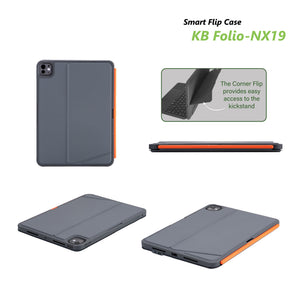
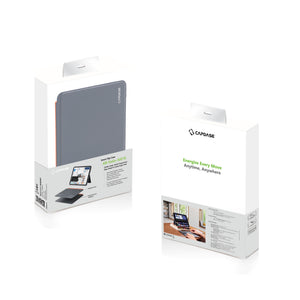
KBAPID10911-DFK17
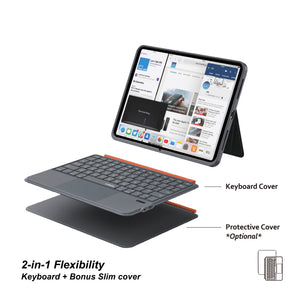
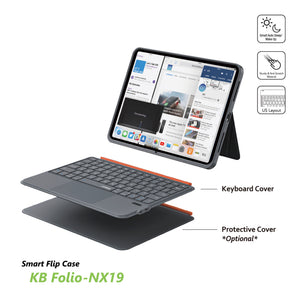
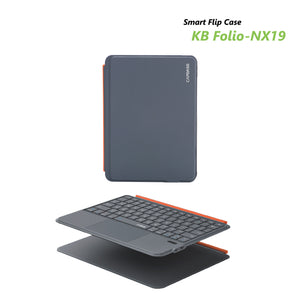
CAPDASE Smart Flip Case Keyboard Folio-NX19
Studio-Grade Tablet Productivity: Type, Swipe & Create Angle-Free
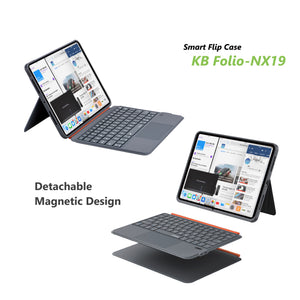
· Detachable Magnetic Design
· Ultra-Lightweight Construction
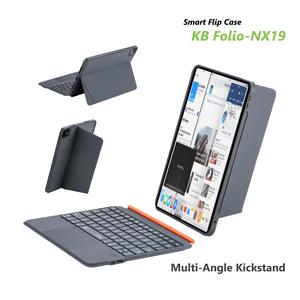
· Multi-Angle Kickstand
· Military-Grade Protection
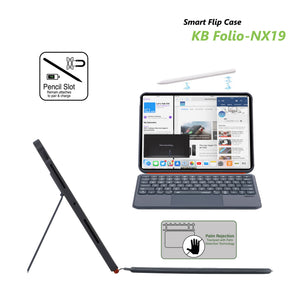
· Integrated Pencil Slot
· Precision-Engineered Smart Trackpad
· Palm Rejection Technology
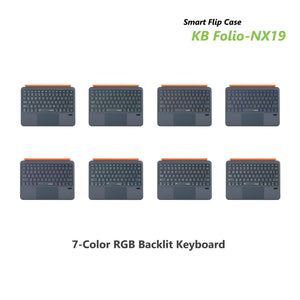
· 7-Color RGB Backlit Keyboard
Unlock Studio-Grade iPad Productivity. Type, Swipe, Create — Seamlessly.
Tired of juggling between a tablet and a laptop? The Folio-NX19 is your all-in-one command center. We engineered it for creators, students, and professionals who refuse to compromise. It transforms your iPad into a powerful, portable workstation with a full-featured keyboard, a precision trackpad for effortless control, and robust protection - all without sacrificing the lightweight feel of your iPad.
Designed for Uninterrupted Flow
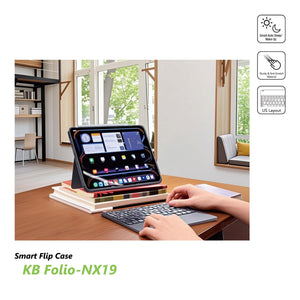
Your best ideas shouldn’t wait. Whether you're drafting a report in a café, sketching concepts on the go, or editing photos late at night, the Folio-NX19 keeps you in the zone. The instant-setup magnetic design and multi-angle stand adapt to your workspace in seconds, while the studio-ready keyboard and trackpad give you the familiar, responsive control you need to create without limits.
Key Features & Benefits
Your Professional-Grade Input Hub
· Precision Smart Trackpad: Navigate your iPad’s interface with intuitive cursor control. Advanced palm rejection technology lets you type and swipe naturally, just like on a premium laptop—no accidental clicks.
· 7-Color RGB Backlit Keyboard: Work in any light. Choose a backlight color to match your style, and enjoy comfortable, quiet typing with well-spaced, responsive keys designed for speed and accuracy.
· Ultra-Lightweight & Detachable: Snap the keyboard on magnetically for serious work, and detach it in a second to enjoy a lightweight, protected tablet for reading, drawing, or media. The strong magnetic connection feels secure and stable.
Adaptable, All-Day Protection
· Multi-Angle Magnetic Kickstand: Position your iPad perfectly for every task. Find the ideal angle for typing, watching, video calls, or using Apple Pencil with stable, hands-free support.
· Military-Grade Drop Protection: Built tough for daily life. The case features shock-absorbing materials and reinforced construction to guard your iPad against bumps, drops, and the rigors of travel.
· Integrated Apple Pencil Slot: Never lose your stylus. A dedicated slot keeps your 2nd Gen Apple Pencil securely attached, charged, and paired, ready to capture inspiration anytime.
Thoughtful, Premium Design
· Auto Wake/Sleep: Your iPad instantly wakes when you open the cover and sleeps when you close it, preserving battery life effortlessly.
· Full Access & Secure Closure: Precise cutouts allow easy use of all ports, buttons, and cameras. A secure magnetic closure keeps the cover shut and your screen protected from scratches.
· Sleek & Portable: The slim, durable design slips easily into bags and backpacks, making it the perfect partner for work, study, and travel.
Compatibility:Designed to
iPad Air 11 (M4/M3/M2) 2026 / 2025 / 2024
iPad (A16) 2024
iPad (10th generation) 2022
iPad Air 10.9” (9h generation) 2021
iPad Air 10.9” (8h generation) 2020
iPad Pro 11 (4th generation) 2022
iPad Pro 11 (3rd generation) 2021
iPad Pro 11 (2nd generation) 2020
Pairing Instructions
Initiate Pairing Mode:
Power on the keyboard.
Press Fn + C – the keyboard enters pairing mode (blue indicator flashes for 3 minutes).
Complete Pairing:
Select “CAPDASE Keyboard” for pairing
Ready to use after paired
Specification:
Operating Range: 10 meters (33 ft)
Modulation Scheme: GFSK (Gaussian Frequency-Shift Keying)
Working Current:
· Active Mode: <9 mA (during touchpad operation)
· Standby Mode: <0.3 mA
· Sleep Mode: <40 μA
Charging Current:
· 100 mA (backlight off) / 200 mA (backlight on)
Standby Time: >100 days (typical)
Charging Time: 2–3 hours (varies by charger)
Battery Capacity:
· 250 mAh (backlight off) / 500 mAh (backlight on)
Working Time:
· <50 hours (backlight on) / <100 hours (backlight off)
Battery Lifespan: Up to 3 years (under normal usage)
Key Actuation Force: 80 ±10 gf (grams-force)
Key Durability: 5 million keystrokes (rated)
Operating Temperature: -10°C to 55°C (14°F to 131°F)
CAPDASE Smart Flip Case Keyboard Folio-NX19
專業級平板生產力:無拘角度,隨心打字、滑動與創作
釋放專業級 iPad生產力。打字、滑動、創作 :一氣呵成。
厭倦了在平板與筆電之間切換嗎?Folio-NX19是您的一體化指揮中心。我們為不願妥協的創作者、學生與專業人士精心打造。它將您的 iPad轉變為功能強大的行動工作站,配備全功能鍵盤、實現輕鬆操控的精準觸控板,以及堅固的防護 —同時毫不犧牲 iPad原有的輕巧手感。
為流暢不中斷的工作流程而設計
您的好點子不該等待。無論是在咖啡廳起草報告、在路上構思草圖,或是深夜編輯照片,Folio-NX19都能讓您保持專注。即時設定的磁吸設計與多角度支架能在數秒內適應您的工作環境,而具備工作室級別的鍵盤與觸控板,則提供您熟悉、反應靈敏的操控體驗,讓創作不受限。
主要特色與優勢
您的專業級輸入中心
適應性強的全日防護
貼心、優質的設計
相容型號:
專為以下機型設計:
iPad Air 11 (M4/M3/M2) 2026 / 2025 / 2024
iPad (A16) 2024
iPad (第10代) 2022
iPad Air 10.9” (第9代) 2021
iPad Air 10.9” (第8代) 2020
iPad Pro 11 (第4代) 2022
iPad Pro 11 (第3代) 2021
iPad Pro 11 (第2代) 2020
配對說明
啟動配對模式:
完成配對:
產品規格:


